
Overview
This resource answers frequently asked questions about electric height-adjustable desks, the new UCSF standard. It includes helpful information about how to order them, how to use them, and who needs to approve them. Find your specific questions below; you do not need to read this entire resource.
Electric height-adjustable desks are now the standard desks for new buildings at UCSF. These desks are available directly from UCSF’s furniture provider, One Workplace, as part of their standard UCSF furniture catalog.
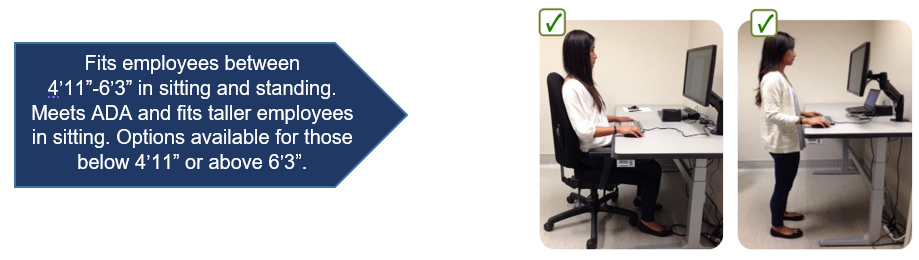
The new standard height-adjustable desks meet all UCSF furniture and safety requirements, including height adjustability between 22 inches-48 inches, fitting approximately 95% of employees. These desks differ from traditional non-adjustable desks, since the user can easily adjust the desk to accommodate appropriate sitting and standing postures. Desks that can easily be adjusted to the right height improve employee health and safety and reduce risk of injury.
FAQs
Why is an electric height-adjustable desk the new UCSF standard?
These desks meet the diverse and changing needs of our population.
Electric desk adjustability provides the best cost/benefit value while improving safety and efficiency.
Work surface heights can be immediately adjusted to support employees who vary in height, tasks and to meet different operational needs.
This reduces risk of discomfort and injuries, and reduces overall cost of ownership.
How do I order a height-adjustable desk?
Contact One Workplace to order a height-adjustable desk.
You must speak with your supervisor prior to purchasing a height-adjustable desk.
Your supervisor and your department are responsible for approving and funding all furniture and equipment purchases.
Are design services required for height-adjustable desks?
If needed, One Workplace offers free consultations for people who need to order furniture, including height-adjustable desks.
They will help to determine options, costs and desk size.
When a height-adjustable desk needs to be placed in a more complex workstation or furniture system, more in-depth design services, including drawings of the proposed redesign, may be required for an additional fee.
Are labor services required for height-adjustable desks?
Desk orders include shipping and simple delivery. For empty workstations, delivery is straightforward. If furniture needs to be moved or removed to allow space for the new desk, labor is required.
When labor services are required, the easiest option is for the user’s department to coordinate furniture removal before the new desk is delivered. One Workplace and UCSF Logistics can assist with labor and recycling services. Both charge for labor in 15-minute increments. UCSF Logistics needs instructions but does not need any drawings to remove furniture. One Workplace may require a minimum amount of design work and a drawing to remove furniture to ensure everything goes as planned.
Free consultations offered by One Workplace include an estimate of whether labor and drawings are required.
What if we don’t have enough money for a height-adjustable desk?
Work with your manager to find ways for you to work safely. This may include purchasing equipment and/or finding alternate ways for you to vary your postures at work. Vary your posture frequently; simply standing up from a sitting posture every 20-30 minutes can help you incorporate postural variation during your day. Rearrange your workstation and rotate your work tasks to encourage movement. Review the resources available at the end of this FAQ, including 50 Ways to Move More at Work.
Ask your department to consider buying one or two approved height-adjustable desks to be used and shared within your department. These can be made available for regular scheduled use or by appointment.
As a manager, I receive many requests for height-adjustable desks. Do you have any guidance on how to prioritize these requests?
It is the supervisor’s responsibility to create and maintain safe work environments for their staff. This includes budgeting for equipment maintenance, repair, purchases and upgrades. Funding for workstation equipment needs to be covered in department budgets, in a similar way that IT equipment (computers and printers) are budgeted for. The UCSF Ergonomics & Human Factors Program is available to provide guidance and training to departments about how to create a safety plan that includes how to prioritize and budget for equipment changes and upgrades. Ergonomics evaluations are not provided to justify department purchases or to recommend standard equipment, including height-adjustable desks.
While new workstations at UCSF will come standard with height-adjustable desks, and while these desks are recommended for all new workstations, departments are not required to retrofit all desks in existing locations.
Departments should plan to replace old and broken equipment as soon as possible. Plan to upgrade other furniture as budget allows. In the meantime, incorporate task rotation and movement into daily work tasks to avoid excessive sitting or standing.
Are rebates or financial assistance available?
Discount pricing is built into the UCSF contract with One Workplace. Lower pricing, improved availability of equipment, and vendor services help UCSF offset furniture costs while providing equipment that has been pre-approved to meet ergonomics, sustainability and safety needs.
Will cheaper alternatives for height-adjustable desks be available in the future?
UCSF is always looking for cost-effective solutions. Supply Chain Management, One Workplace, the UCSF Ergonomics & Human Factors Program, and UCSF Sustainability partner to monitor development of new solutions to meet furniture needs at UCSF. Equipment that meets requirements will be made available through One Workplace.
I just want a cheap solution that lets me stand at the computer. Can I order an add-on sit-stand unit to place on top of my desk?
Avoid the use of add-on sit-stand units that are added on top or front of existing workstations. Various manufacturers make these units (including those shown below). However, these units do not meet UCSF ergonomics and safety requirements.
While these units may seem cheaper on the front end, use of these desks leads to injuries and increased costs.
AVOID THESE TYPES OF UNITS:
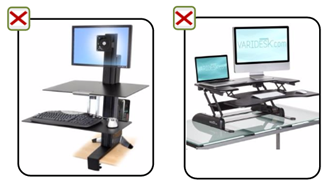
Add-on units increase risk of injury and are not supported or recommended at UCSF for the following reasons:
Lack of adjustability: Despite how these units are marketed, their limited adjustability ranges frequently prevent safe sitting and standing postures, which can increase discomfort and cause injury. Limited adjustability prevents them from being modified to safely fit our employees and prevents them from meeting UCSF ergonomics and safety requirements.
Space requirements: Add-on units take up a majority of the desk space. This promotes risky postures and leads to awkward positions such as overreaching for items not positioned on the unit.
Maintenance: Some units may have parts that can become loose, requiring frequent calibration or maintenance, thus exposing users to unstable units. This can also lead to higher maintenance costs. UCSF does not have staff available to maintain this equipment.
Safety: Add-on units may pose risk during an earthquake.
Sustainability: These units are not included in UCSF’s recycling program and do not support UCSF Zero Waste 2020 goals.
Due to the reasons above, add-on units have been removed from UCSF.
Unfortunately, people do not understand the consequences of the add-on unit limitations until after they are purchased and installed. It is then too late to return them.
Is medical documentation required for a height-adjustable desk?
Because height-adjustable desks are now considered standard for all new workstations, medical documentation, such as a doctor’s note, is not needed to order these desks. Please note that employees with non-occupational health conditions who are requesting a height-adjustable desk as part of the interactive process may have separate documentation requirements. Contact UCSF Disability Management Services for information.
Are ergonomics evaluations required to obtain height-adjustable desks?
As the approved height-adjustable desk is now standard in all new UCSF buildings and workstations, the UCSF Ergonomics & Human Factors Program expects that these desks be readily available at all computer workstations. Therefore, an ergonomics evaluation is neither required nor indicated to secure a height-adjustable desk.
The UCSF Ergonomics & Human Factors Program partnered with One Workplace to ensure that the new standard-height-adjustable desk they offer meets all ergonomics requirements for computer workstations.
In cases where an employee’s height is below 4 feet 11 inches or above 6 feet 3 inches, we recommend an ergonomics consult to identify suitable options.
What size desk do I need?
While other sizes are available, the preferred desk size is at least 60 inches x 30 inches, as it fits most people and provides space for multiple work tools (computer, phone, paperwork), allowing for safe and comfortable use. Longer desks, for example 70 inches x 30 inches, are available for those who have more equipment or need additional space. Desk size is typically reduced by 1 inch on each side to allow it to fit easily between existing work surfaces.
Rectangular desks are recommended because they are cost-effective and flexible, meeting the needs of most employees across all UCSF locations. Rectangular desks can easily be combined with other furniture to create L- and U-shaped workstations. If possible, consider placing the height-adjustable desk adjacent to or at a 90-degree angle to another existing work surface. L-shaped electric height desks are not recommended because they are more expensive, less flexible, and more difficult to relocate and reuse.
For maximum legroom, avoid placing storage units and other items below the desk.
One Workplace will help you determine the best option. They also offer other furniture that can accompany these desks, including side desks and storage units.
What height should I set the desk at when sitting and standing?
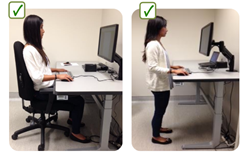
- Bend your elbows approximately 110 degrees (slightly more open than 90 degrees)
- Adjust the desk so the undersides of your forearms are supported gently by the desk.
- Your shoulders should be relaxed, not be pushed upwards by the desk.
- Your wrists should be straight, not bent up or down.
- Keep your keyboard and mouse within easy reach so you do not have to reach forward.
- Keep monitor(s) in line with the top of your eyes, so your head is level and balanced on top of your shoulders and spine.
- The primary focus area on your screen should be slightly below eye level.
- Sit or stand with your spine aligned, not twisted or leaning forward or to the side.
- Use comfortable, supportive shoes that allow for balanced spine postures in sitting and standing.
- Avoid prolonged sitting or standing. Incorporate movement whenever possible.
Refer to Finding the Right Desk Height for more information. To learn more, take Office Ergonomics Training.
I rarely see people standing at these desks. Are they using them properly?
It is not necessary to stand at these desks. Height-adjustable desks are used properly when the desk is set at the right height for the person sitting or standing at the desk, which the desk's height adjustment easily allows. Some users adjust the desk height a few inches up and down to support different tasks throughout the day.
Note that people have different preferences and tolerances for how they work. For example, some people do not like standing and working because they find it hard to concentrate. Some people may feel comfortable standing for short periods during the day for certain tasks. However you use the desk, make sure to take adequate postural breaks and incorporate movement throughout the day. Avoid prolonged sitting or standing.
Refer to Sitting/Standing: Fatigue and Postural Variation for more information.
Are keyboard trays required with height-adjustable desks?
While keyboard trays are not required, they allow for additional adjustability of the input devices when needed. If employees need or prefer to keep their input devices positioned on an angled surface, keyboard trays can be added to height-adjustable desks to allow for this. A keyboard tray can also be placed for those who need more visual distance from the monitor(s), or for those who use document holders between their keyboard tray and monitors.
Do I need to use a monitor arm with a height-adjustable desk?
While monitor arms are not required, they allow for additional adjustability options to fit most users in sitting and standing. Monitor arms allow for quick and easy increased height adjustment to fit multiple users. There may be space saving and operational benefits to using a monitor arm. Arms can free up some desk space below the monitor. Arms allow monitors to be easily moved out of the way or positioned to allow shared viewing during meetings. A monitor arm can also be helpful for those who require a greater visual distance to view the monitor.
What if I am shorter than 4 feet 11 inches or taller than 6 feet 3 inches? Will the standard desk fit me?
Taller people: Standard desks fit all taller users in sitting. They typically fit users up to 6 feet 3 inches in standing. For users over 6 feet 3 inches, One Workplace can add locking casters to these desks to add a few inches of height to the desks to allow for taller standing heights, if needed. Note that this may impact the stability of the desk.
Shorter people: Standard desks fit all shorter users in standing, and will fit users over 4 feet 11 inches in sitting. For users under 4 feet 11 inches, a keyboard tray can be added to the height-adjustable desk to lower the input devices to elbow height and allow for relaxed shoulders.
Where can I find the user guide for the desk?
User guides are available from One Workplace.
My height-adjustable desk needs maintenance. What should I do?
For desk usage questions or maintenance needs, refer to the user guide or contact One Workplace.
If the desk does not adjust at all, do the following:
Make sure the plug is connected
If the desk becomes disconnected from power or a power failure occurs, the desk must be reset.
To reset the desk, press the down arrow until the desk is in the lowest position. Keep pressure on the down arrow button until you hear several clicks. This will reset the desk and allow it to adjust up and down.
How do I contact One Workplace?
Visit the UCSF E-commerce website in BearBuy to purchase products and request service or contact [email protected]. The website also has instructions on how to start a request for project or quote and request a service or warranty repair.